Authorization guide
This guide will help you figure out what you need to log in to internal services, which steps you should take, and how to get access to platform — the main tool for completing tasks.
What you need for authorization
-
Username
You can find it in the welcome email.
Email subject: Setup accesses.
-
Domain password
You'll receive it via SMS. It consists of 15 characters.
-
Yandex ID mobile app
Download the Yandex ID app for Android or iOS.
To learn more about the app, see the Yandex ID Help.
Authorization process
-
Go to the authorization page.
-
Enter your username and domain password.
-
You'll be prompted to confirm your phone number. Press Confirm.
-
Then you'll receive an SMS with a code, which you need to enter in the field that appears.
-
After that a window with a QR code and your secret key will open. You'll need this secret key later for configuring your Yandex ID.
-
Configure the Yandex ID app.
-
Make sure that the correct time zone is set on your smartphone and that the time is accurate down to the minute.
-
Open Yandex ID.
-
Select Scan QR code.
Screenshot — the button Scan QR code
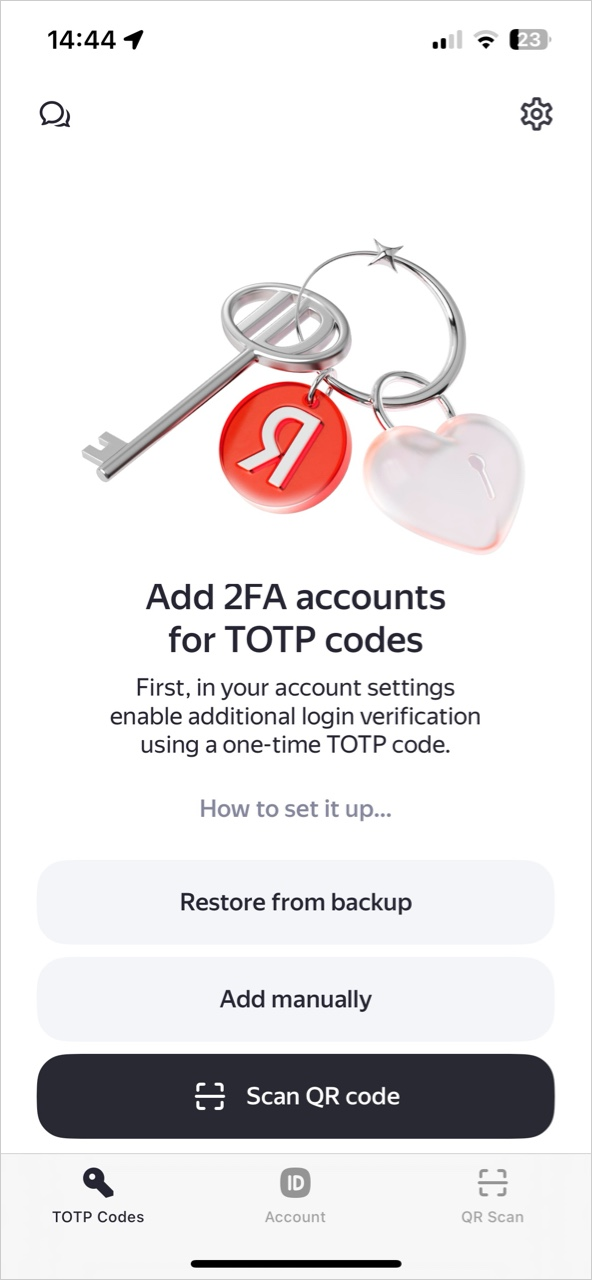
The right data will be used automatically.
Warning
When you first log in to the system, you'll be prompted to change the password you received in the SMS to a unique password.
If you manage to change your password, use this unique password in the future. Make sure to check your keyboard layout and Caps Lock before typing your password.
-
FAQ
I have no domain password. What should I do?
The domain password will be sent to the SMS the day before or on the day specified in the documents. If you don't receive this message during the day, contact your agency for assistance.
I don't remember my domain password. What should I do?
Contact your agency for assistance.
I can't change my domain password. What should I do?
Make sure your password meets the requirements:
- The password should be at least 14 characters long.
- It should include at least three of the following character sets: uppercase letters, lowercase letters, numbers, and special characters.
- You can't reuse passwords.
- The password shouldn't include domain usernames, well-known abbreviations, or common character combinations (for example, qwerty or asdf).
You can use an online password generator to quickly generate a strong password.
My domain password doesn't work. What should I do?
- During your first log in the system prompts you to change your password. If it's not your first log in, you need to enter a new password, not the password you received via SMS.
- Check your keyboard layout and Caps Lock.
- Try to copy and paste the password rather than typing it manually. Make sure you don't copy the spaces before and after the password.
- Enable Incognito mode and try logging in in this mode.
I noticed a message «To log in from an external network, you need a one-time password (TOTP)».
-
If this is the first time you are logging in and you see a message requiring a one-time password (TOTP), try logging in again in a few hours. Sometimes the system needs a little more time.
If nothing has changed during the day, contact your agency for assistance.
-
If this is not your first authorization, contact your agency for assistance.
One-time password doesn't work. What should I do?
- Make sure that the code you type in the one-time password field is the 6-digit code from Yandex ID.
- Try reinstalling and reconfiguring the Yandex ID app. Before you configure the app, make sure the automatic time setting option is enabled on your smartphone.
The site displays the REQUEST_YOUR_ADMIN error. What should I do?
Please, make sure you are using the correct link to log in.
What's a token and where do I get one?
A token is a special device. If you need it to complete tasks, we'll have it delivered to you by a courier within a month. If you don't have it or don't need it, just skip the instructions on how to set it up.
You can still log in without a token by following the instructions above.
The authorization page doesn't open. What should I do?
We use Yandex Browser exclusively to complete tasks. Install it and try again.
Our tools may not work correctly in other browsers. Also, you aren't allowed to use other browsers for information security reasons. If the page doesn't open in Yandex Browser, contact your agency for assistance.
Tip
If you don't see the answer to your question in the list, contact your agency for assistance.
Provide as much details as possible about the step you're having trouble with and attach screenshots. That way we'll be able to figure out what's wrong and help you faster.